Vlan چیست؟
Vlan چیست؟
در این مقاله قصد داریم درباره Vlan و کاربرد آن صحبت کنیم.
امیدواریم شما با مطالعه این مقاله پاسخ سوالات خود را بیابید.
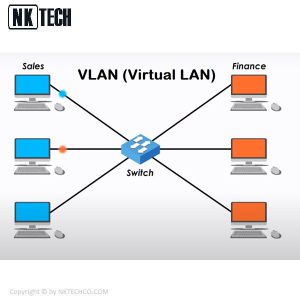
VLAN یک شبکه سفارشی است که از یک یا چند شبکه محلی ایجاد می شود.
این امکان را برای گروهی از دستگاههای موجود در چندین
شبکه فراهم می کند تا در یک شبکه منطقی ترکیب شوند.
VLAN به عنوان شبکه محلی مجازی تعریف شده است.
LAN مجازی (Virtual LAN) به قسمت جدا و تقسیم شده در لایه Data Link
شبکه که موجب به وجود آمدن چندین Broadcast Domain های مختلف می شود، گفته می شود.
Local Area Network یا همان Lan به معنی یک شبکه محلی است
و کلمه V در Vlan مخفف Virtual می باشد که به یک حالت منطقی (Logic)
بازسازی شده به جای یک قطعه فیزیکی در شبکه اشاره می کند.
Vlan چیست؟
شبکه محلی مجازی VLAN چیست؟
از جدیدترین تکنولوژی هایی که مورد توجه مدیران
شبکه قرار گرفته است می توان به VLAN اشاره نمود.
امروزه به دلیل رشد شبکه های LAN و نیاز به کاهش هزینه های شبکه
با توجه به خرید تجهیزات گرانقیمت بدون اینکه امنیت و کارایی خود
را از دست بدهد به شبکه محلی مجازی یا VLAN توجه بیشتری شده است.
در گذشته یک شبکه کوچک از طریق به هم وصل شدن کابل های اترنت
شبکه های LAN بین سرورها ایجاد می شد. و این امر به دلیل کابل کشی
هزینه زیادی را در پی داشت. امروزه با استفاده از شبکه های بی سیم
شبکه های LAN به هم متصل می شوند و دیگر به کابل کشی نیاز ندارد.
در حال حاضر VLAN ها به دلیل ساختار مجازی که دارند
محدودیت های موجود در LAN را برطرف کرده.
امروزه با توجه به پیشرفت شرکت ها و سازمان ها به شبکه های انعطاف پذیرتری نیاز دارند
و به دنبال راه هایی در پی افزایش سرعت انتقال دیتا و امنیت هستند.
Vlan چیست و چه کاربردی دارد؟
شبکههای محلی مجازی و یا VLAN از انعطاف پذیری بالایی برخوردار است
زیرا از اتصالات منطقی استفاده می کند و بی نیاز از اتصالات فیزیکی است.
قبل تر گفتیم VLAN موجب افزایش امنیت شبکه می شود زیرا میزان کنترل
و دسترسی دستگاه ها به یکدیگر را برای مدیران شبکه فراهم می کند.
VLAN این امکان را برای مدیران شبکه فراهم می کند تا یک شبکه سوئیچ شده
را بدون نیاز به اجرای کابل های جدید یا ایجاد تغییرات عمده در زیرساخت های
شبکه فعلی خود ، مطابق با نیازهای عملکردی و امنیتی سیستم های
خود تقسیم کنند. یک یا چند سوئیچ شبکه ممکن است از VLAN های مستقل
چندگانه پشتیبانی کرده و پیاده سازی لایه های ۲ (پیوند داده) از زیر شبکه ها را ایجاد کند.
VLAN با دامنه پخش ارتباط دارد. معمولاً از یک یا چند سوئیچ شبکه تشکیل شده است.
نحوه کار VLAN
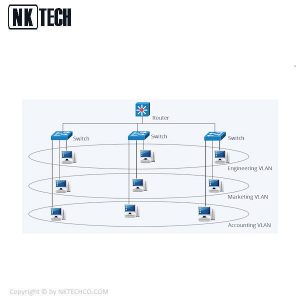
شبکه های محلی مجازی (VLAN) یک شبکه فیزیکی موجود را به چندین
شبکه منطقی جدا می کند. بنابراین ، هر VLAN دامنه پخش خود را ایجاد می کند.
ارتباط بین دو شبکه VLAN فقط از طریق روتر امکان پذیر است
که به هر دو متصل باشد. VLAN ها به گونه ای کار می کنند
که گویی با استفاده از سوئیچ های مستقل ایجاد شده اند.
در صورتی که شبکه های محلی مجازی وجود نداشته باشند پیام هایی
که در شبکه منتشر می شود همه ی ابزارهایی که قابلیت دریافت دارند
این پیام ها را دریافت و پردازش می کنند. در اینصورت دریافت کننده
بدون اینکه دریافت کننده اصلی باشد پیام تحت شبکه
را بیهوده پردازش می کند و قدرت شبکه را کاهش می دهد.
ما می توانیم در این زمان یک رابط کاربری را بین دو سوئیچ به صورت جداگانه
در شبکه های VLAN قرار دهیم. در اینصورت پیام های ارسالی
فقط توسط ابزارهایی که در شبکه محلی مجازی همسان هستند دریافت می شود.
با این کار از پردازش های اضافی در شبکه کاسته می شود و به عملکرد شبکه بهبود می بخشد.
نحوه کار vlan
ویژگیهای VLAN
- با استفاده از شبکه محلی مجازی و یا VLAN میتوان
در یک شبکه محلی ترافیک اشتراک گذاری فایل ها را کاهش داد.
- امکان اتصال چند سوئیچ را به هم فراهم می کند.
- با پیاده سازی شبکه محلی مجازی امنیت شبکه خود را افزایش دهید،
زیرا با این کار می توانید تعداد هاست هایی که در مسیر
انتشار شدن یک پیام وجود دارد را کاهش دهید.
- می توانید به راحتی ترمینال ها را اختصاص دهید.
- با استفاده از VLAN شما می توانید کاربران را براساس
دپارتمان آن ها نه مکان جغرافیاییشان گروه بندی کنید.
- دامنه انتشار را در شبکه محلی خود افزایش دهید.
انواع VLANها
Default VLAN
وی لن پیش فرض نوعی از VLAN است که در هنگام راه اندازی و تنظیمات
به عنوان عضوی از VLAN به شمار می رود.
(به طور کلی همه سوئیچ ها VLAN پیش فرض دارند که به عنوان VLAN 1 نامگذاری می شوند)
، که همه آنها را بخشی از یک دامنه پخش یکسان می کند.
Data VLAN
از این نوع VLAN برای رای حمل داده های کاربر مورد استفاده قرار می گیرد.
Data VLAN برای تقسیم کل شبکه به ۲ گروه استفاده می شود.
گروهی از کاربران و گروه دیگر دستگاه ها.
از این نوع VLAN برای برای حمل ترافیک مدیریتی یا صوتی استفاده نمی شود.
Voice VLAN
Voice VLAN برای انتقال ترافیک صدا پیکربندی شده است.
برای اطمینان از کیفیت صدا از طریق IP (VoIP)
(تأخیر کمتر از ۱۵۰ میلی ثانیه (میلی ثانیه) در شبکه) ،
باید VLAN صوتی جداگانه داشته باشیم زیرا این امر
باعث پهنای باند سایر برنامه ها می شود.
Management VLAN
از این نوع برای دسترسی مدیریتی به تنظیمات سوئیچ ها طراحی شده است
این VLAN تضمین می کند که پهنای باند برای
مدیریت حتی در هنگام مراجعه کاربر زیاد است.
Native VLAN
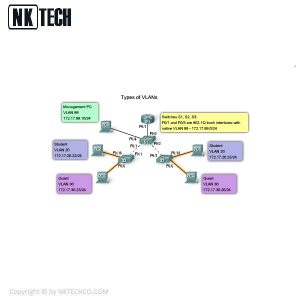
نوعی از VLAN است که به پورت های ترانک رابط برای انتقال داده
بین VLAN های مختلف اختصاص داده شده است.
Vlan چیست؟
سوئیچ شبکه چیست
سوئیچ شبکه یک دستگاه سخت افزاری است که
وظیفه برقراری ارتباط بین دستگاه ها در یک شبکه (شبکه محلی)
و انتقال بسته های داده (Packet) از مبدا به مقصد را برعهده دارد .
سوئیچ های شبکه به دلیل داشتن پردازنده در درون خود
, بسته های داده ورودی و خروجی را بافر می کند ,
که باعث می شود سوئیچ در هدایت بسته های داده
هوشمند تر عمل کرده و کنترل بیشتری را اعمال کند.
از طرفی می توان گفت سوئیچ ابزاری است هوشمند ,
که فریم های دریافتی از پورت ها را می گیرد
و براساس آدرس مقصدی که در فریم درج شده ,
روی پورتی منتقل می کند که ماشین مقصد به آن پورت متصل است .
برای دیدن ادامه این مقاله کلیک کنید.
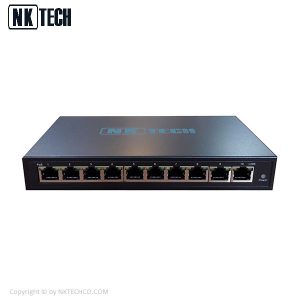
سوئیچ شبکه PoE انکاتک مدل PSE108R
سوئیچ شبکه PoE انکاتک مدل PSE108R تولید شرکت انکاتک می باشد
که از قابلیت PoE پشتیبانی می کند ، سوئیچ های تولید این شرکت دارای
قابلیت PoE می باشند و می توانند جریان برق را در کابل های شبکه
برقرار کنند به این منظور استفاده از کابل های با کیفیت بالا
در زمان افت ولتاژ لازم است که در عملکرد سوئیچ تاثیر منفی نداشته باشد .
این سوئیچ دارای ۱۰ پورت که ۸ پورت آن قابلیت POE دارند و ۲ پورت آپلینک مگابیت می باشد .
سوئیچ شبکه PoE انکاتک مدل PSE108R
در ادامه مرجع مقالات گذاشته می شود.
What is VLAN?
VLAN is a custom network which is created from one or more local area networks. It enables a group of devices available in multiple networks to be combined into one logical network. The result becomes a virtual LAN that is administered like a physical LAN. The full form of VLAN is defined as Virtual Local Area Network.
Without VLANs, a broadcast sent from a host can easily reach all network devices. Each and every device will process broadcast received frames. It can increase the CPU overhead on each device and reduce the overall network security.
What is a VLAN?
A VLAN (virtual LAN) is a subnetwork which can group together collections of devices on separate physical local area networks (LANs). A LAN is a group of computers and devices that share a communications line or wireless link to a server within the same geographical area.
VLANs make it easy for network administrators to partition a single switched network to match the functional and security requirements of their systems without having to run new cables or make major changes in their current network infrastructure. VLANs are often set up by larger businesses to re-partition devices for better traffic management.
VLANs are also important because they can help improve the overall performance of a network by grouping together devices that communicate most frequently. VLANs also provide security on larger networks by allowing a higher degree of control over which devices have access to each other. VLANs tend to be flexible because they are based on logical connections, rather than physical.
Types of VLANs
Types of VLANs include Protocol based, static and dynamic VLANs.
-
- A Protocol VLAN- which has traffic handled based on its protocol. A switch will segregate or forward traffic based on the traffics protocol.
- Static VLAN- also referred to as port-based VLAN, needs a network administrator to assign the ports on a network switch to a virtual network; while:
- Dynamic VLAN- allows a network administrator just to define network membership based on device characteristics, as opposed to switch port location.
-
How VLAN works
Ports (interfaces) on switches can be assigned to one or more VLANs, enabling systems to be divided into logical groups — based on which department they are associated with — and establish rules about how systems in the separate groups are allowed to communicate with each other. These groups can range from the simple and practical (computers in one VLAN can see the printer on that VLAN, but computers outside that VLAN cannot), to the complex and legal (for example, computers in the retail banking departments cannot interact with computers in the trading departments).
Each VLAN provides data link access to all hosts connected to switch ports configured with the same VLAN ID. The VLAN tag is a 12-bit field in the Ethernet header that provides support for up to 4,096 VLANs per switching domain. VLAN tagging is standardized in IEEE (Institute of Electrical and Electronics Engineers) 802.1Q and is often called Dot1Q.
How VLAN works
When an untagged frame is received from an attached host, the VLAN ID tag configured on that interface is added to the data link frame header, using the 802.1Q format. The 802.1Q frame is then forwarded toward the destination. Each switch uses the tag to keep each VLAN’s traffic separate from other VLANs, forwarding it only where the VLAN is configured. Trunk links between switches handle multiple VLANs, using the tag to keep them segregated. When the frame reaches the destination switch port, the VLAN tag is removed before the frame is to be transmitted to the destination device.
Multiple VLANs can be configured on a single port using a trunk configuration in which each frame sent via the port is tagged with the VLAN ID, as described above. The neighboring device’s interface, which may be on another switch or on a host that supports 802.1Q tagging, will need to support trunk mode configuration to transmit and receive tagged frames. Any untagged Ethernet frames are assigned to a default VLAN, which can be designated in the switch configuration.
-
How VLAN works
When a VLAN-enabled switch receives an untagged Ethernet frame from an attached host, it adds the VLAN tag assigned to the ingress interface. The frame is forwarded to the port of the host with the destination MAC address(media access control address). Broadcast, unknown unicast and multicast (BUM traffic) is forwarded to all ports in the VLAN. When a previously unknown host replies to an unknown unicast frame, the switches learn the location of this host and do not flood subsequent frames addressed to that host.
The switch-forwarding tables are kept up to date by two mechanisms. First, old forwarding entries are removed from the forwarding tables periodically, often a configurable timer. Second, any topology change causes the forwarding table refresh timer to be reduced, triggering a refresh.
-
How VLAN works
The Spanning Tree Protocol (STP) is used to create loop-free topology among the switches in each Layer 2 domain. A per-VLAN STP instance can be used, which enables different Layer 2 topologies or a multi-instance STP (MISTP) can be used to reduce STP overhead if the topology is the same among multiple VLANs. STP blocks forwarding on links that might produce forwarding loops, creating a spanning tree from a selected root switch. This blocking means that some links will not be used for forwarding until a failure in another part of the network causes STP to make the link part of an active forwarding path.
-
There are 5 main types of VLANs depending on the type of the network they carry:
Vlan چیست؟
-
Default VLAN
- –
When the switch initially starts up, all switch ports become a member of the default VLAN (generally all switches have default VLAN named as VLAN 1), which makes them all part of the same broadcast domain. Using default VLAN allows any network device connected to any of the switch port to connect with other devices on other switch ports. One unique feature of Default VLAN is that it can’t be rename or delete.
-
Data VLAN
- –
Data VLAN is used to divide the whole network into 2 groups. One group of users and other group of devices. This VLAN also known as a user VLAN, the data VLAN is used only for user-generated data. This VLAN carrying data only. It is not used for carrying management traffic or voice.
-
Voice VLAN
- –
Voice VLAN is configured to carry voice traffic. Voice VLANs are mostly given high transmission priority over other types of network traffic. To ensure voice over IP (VoIP) quality (delay of less than 150 milliseconds (ms) across the network), we must have separate voice VLAN as this will preserve bandwidth for other applications.
- A management VLAN is configured to access the managemen
Vlan چیست؟
-
Management VLAN –
- t capabilities of a switch (traffic like system logging, monitoring). VLAN 1 is the management VLAN by default (VLAN 1 would be a bad choice for the management VLAN). Any of a switch VLAN could be define as the management VLAN if admin as not configured a unique VLAN to serve as the management VLAN. This VLAN ensures that bandwidth for management will be available even when user traffic is high.
-
Native VLAN –
-
This VLAN identifies traffic coming from each end of a trunk link. A native VLAN is allocated only to an 802.1Q trunk port. The 802.1Q trunk port places untagged traffic (traffic that does not come from any VLAN) on the native VLAN. It is a best to configure the native VLAN as an unused VLAN.
Attention reader! Don’t stop learning now. Get hold of all the important CS Theory concepts for SDE interviews with the CS Theory Course at a student-friendly price and become industry ready.
Vlan چیست؟
Virtual Local Area Networks (VLANs) separate an existing physical network into multiple logical networks. Thus, each VLAN creates its own broadcast domain. Communication between two VLANs can only occur through a router that is connected to both. VLANs work as though they are created using independent switches.
In short, there are 2 types of VLANs:
- Port-based VLANs (untagged)
- Tagged VLANs